Introduction to ZKPDF
ZKPDF is a library that enables you to create zero-knowledge proofs about data contained within PDF documents. It allows you to cryptographically prove properties about PDFs without revealing their full contents, making it particularly useful for verifying digital signatures and proving that specific statements appear in documents.
*Note: The current implementation exposes data to SP1's prover network; therefore, we highly recommend only using the provided PDF templates for testing. Future iterations will focus on client-side proofing capabilities.
Quick Links
- 🔗 ZKPDF Compatibility Checker - Test if your PDF works with zkPDF
- 🚀 zkPDF Template - Ready-to-use template with GST certificate example
- 📚 Blog Post - Learn how signed data becomes SNARKed
- 🌐 Succinct Prover Network - Access form for hackathon proving
- 📖 API Reference - Complete function documentation
- ⚡ Quick Start - Get up and running in minutes
The Ever-Expanding Ecosystem of Signed Data
We've already made remarkable progress in "SNARKifying" various forms of signed data. The ability to cryptographically verify information while preserving privacy can be used in real-world applications at scale. Consider what is actively in use today:
- ZK-Email: Email verification, allowing users to prove specific facts about email content without revealing the email itself
- National Identity Cards: India's Aadhaar program has over 1.4 billion digital identities, Projects like Anon Aadhaar allows users to prove they have a valid Aadhaar card and are over 18 without revealing their identity number, name, or other personal details
- Electronic Passports (zkpassport): There are 1.2+ billion e-passports in global circulation, each containing cryptographically signed biometric data that prevents forgery and identity theft at borders—a testament to worldwide adoption of verifiable physical documents
- Web Data (zkTLS): Emerging technologies like zkTLS allow users to prove specific content on a website
The PDF Gap
The PDF Association estimates that "well over 90 percent of all signed documents are PDFs," with the e-signature market projected to grow at over 25% annually through 2025, representing a substantial volume of signed data.
ZKPDF bridges this critical gap, bringing the power of zero-knowledge verification to the world's most popular document format.
What ZKPDF Does
ZKPDF abstracts away all the complex PDF parsing, signature validation, and cryptographic proof generation. You simply provide a PDF and specify what you want to prove—zkPDF handles all the technical complexity behind the scenes.
The library focuses on three core capabilities:
- Digital Signature Verification: Prove that a PDF contains a valid digital signature from a trusted authority
- Content Verification: Prove that specific text appears at exact locations within a PDF document
- Privacy-Preserving Verification: Verify document properties without exposing sensitive content
You don't need to understand PDF parsing, PKCS#7 structures, or zero-knowledge circuits, zkPDF abstracts all of this complexity into simple, easy-to-use APIs.
Real-World Applications
- Financial Services: Bank statements, tax documents, insurance claims
- Government & Compliance: Identity documents, business certificates, legal documents
- Healthcare: Medical records, vaccination status, insurance verification
How Signed Data Becomes SNARKed
This section explains what happens under the hood when you use zkPDF—you don't need to implement any of this yourself.
The process of converting signed PDF data into zero-knowledge proofs involves several key steps that zkPDF handles automatically:
1. PDF Parsing and Signature Extraction
ZKPDF uses pure Rust libraries to parse PDF documents and extract embedded digital signatures. This includes:
- Parsing PKCS#7/CMS signature structures
- Extracting certificate chains and signature metadata
- Validating signature integrity using cryptographic hash functions
- Supporting various signature algorithms (RSA-SHA256, RSA-SHA1)
- Handling complex PDF layouts and embedded fonts
2. Content Verification
The library can verify that specific text appears at precise byte offsets within the PDF:
- Extracts Unicode text from PDF streams using custom font encoding support
- Tracks exact positions of text elements on specific pages
- Validates that claimed content matches the actual document structure
- Handles various PDF text encodings and font mappings
3. Zero-Knowledge Proof Generation
Using SP1 circuits, ZKPDF generates cryptographic proofs that demonstrate:
- The PDF contains a valid digital signature from a trusted certificate authority
- The signature was created by the claimed signer
- Specific text appears at the claimed location within the document
- All verification was performed correctly without revealing the full document content
Features
- No External Dependencies: Pure Rust implementation without OpenSSL or C libraries
- Browser Compatible: WebAssembly support for client-side processing
- Cross-Platform: Works across different operating systems and environments
- EVM Compatible: Generated proofs can be verified on Ethereum and other EVM-compatible chains
Key Benefits
- Privacy: Verify document properties without exposing sensitive content
- Trust: Cryptographic guarantees about document authenticity and content
- Efficiency: Lightweight verification suitable for blockchain applications
- Flexibility: Works with various PDF types and signature schemes
- Selective Disclosure: Prove only the specific information you need to reveal
- Tamper Evidence: Any modification to the document invalidates the proof
Learn More
For a deeper dive into ZKPDF's capabilities, technical implementation, and real-world use cases, read our comprehensive blog post: ZKPDF: Unlocking Verifiable Data in the World's Most Popular Document Format
The blog post covers:
- Detailed technical architecture and implementation
- Real-world case studies and applications
- Performance benchmarks and optimization strategies
- Integration patterns for different blockchain networks
Next Steps
- Quick Start: Get up and running in minutes
- API Reference: Complete function documentation
- Proving: Set up proof generation workflows
- On-chain Verification: Integrate blockchain verification
Quick Start
Get started with ZKPDF in minutes! This guide will walk you through setting up a zkPDF project using our complete template.
Starting with zkPDF Template
The fastest way to get started is using our complete zkPDF template:
-
Clone the zkPDF template:
git clone https://github.com/privacy-ethereum/zkpdf-template.git cd zkpdf-template -
Install SP1 (if not already installed):
curl -L https://sp1.succinct.xyz | bash source ~/.bashrc -
Build the project:
cargo build
Understanding the Template Structure
The zkPDF template includes everything you need:
program/src/main.rs: SP1 program with zkPDF integrationscript/src/bin/main.rs: CLI tools for execution and provingscript/src/bin/evm.rs: EVM-compatible proof generationsamples/: Sample PDFs for testingcontracts/: Smart contracts for on-chain verification
Understanding zkPDF Verification
Before diving into the code, let's understand how zkPDF verification works:
The verify_and_extract Method
The verify_and_extract method is the core function that:
- Parses PDF Structure: Extracts text content and embedded digital signatures
- Validates Signatures: Verifies PKCS#7/CMS digital signatures using cryptographic validation
- Extracts Information: Pulls out specific data like GST numbers, legal names, or any text content
- Generates Commitments: Creates cryptographic hashes for document integrity
- Returns Results: Provides verification status and extracted data without revealing sensitive information
This method abstracts away all the complex PDF parsing, signature validation, and cryptographic operations, making it easy to verify document authenticity while preserving privacy.
Your First zkPDF Program
The template's program/src/main.rs shows GST certificate verification:
//! GST Certificate Verification Program
//!
//! This program verifies GST certificate PDFs and extracts key information:
//! - GST number
//! - Legal name
//! - Digital signature validity
//! - Document commitment hash
//! - Public key hash
//!
//! The program runs inside the SP1 zkVM to generate zero-knowledge proofs
//! that prove the document is valid without revealing sensitive data.

#![no_main]
sp1_zkvm::entrypoint!(main);

use alloy_primitives::keccak256;
use alloy_sol_types::SolType;
use zkpdf_template_lib::{utils::generate_commitment, verify_gst_certificate, PublicValuesStruct};

pub fn main() {
    // Read PDF bytes as input to the program.
    let pdf_bytes = sp1_zkvm::io::read::<Vec<u8>>();

    // Verify the GST certificate and extract information.
    let gst_cert =
        verify_gst_certificate(pdf_bytes.clone()).expect("Failed to verify GST certificate");

    // Generate commitment hash using the new function
    let document_commitment = generate_commitment(&gst_cert);
    let public_key_hash = keccak256(&gst_cert.signature.public_key);

    // Encode the public values of the program.
    let bytes = PublicValuesStruct::abi_encode(&PublicValuesStruct {
        gst_number: gst_cert.gst_number,
        legal_name: gst_cert.legal_name,
        signature_valid: gst_cert.signature.is_valid,
        document_commitment: document_commitment
            .as_slice()
            .try_into()
            .expect("Failed to convert document commitment to FixedBytes"),
        public_key_hash: public_key_hash
            .as_slice()
            .try_into()
            .expect("Failed to convert public key hash to FixedBytes"),
    });

    // Commit to the public values of the program.
    sp1_zkvm::io::commit_slice(&bytes);
}
Running Your Project
The template comes with GST certificate samples ready to use:
-
Execute the program:
cd script cargo run --release -- --execute -
Generate a core proof:
cargo run --release -- --prove -
Generate an EVM-compatible proof:
# Groth16 proof cargo run --release --bin evm -- --system groth16 # PLONK proof cargo run --release --bin evm -- --system plonk -
Use your own GST certificate:
# Execute with custom GST certificate
cargo run --release --bin evm -- --system groth16 --pdf-path /path/to/your/gst-certificate.pdf

# Generate proof with custom certificate
cargo run --release --bin evm -- --system plonk --pdf-path /path/to/your/gst-certificate.pdf
Generating Groth16 Proofs
In the following sections, we'll see how to generate Groth16 proofs, which are optimized for on-chain verification. Groth16 proofs offer:
- Efficient Verification: Fast verification on Ethereum and other EVM-compatible chains
- Small Proof Size: Compact proofs that reduce gas costs
- Wide Compatibility: Supported by most zero-knowledge proof systems
The template includes both Groth16 and PLONK proof generation options, with Groth16 being the recommended choice for blockchain applications.
Next Steps
- API Reference: Complete reference for zkPDF library functions and usage
- Prover Network: Learn how to use the Succinct Prover Network for distributed proving
- Architecture: Learn how ZKPDF works under the hood
- Proving: Generate zero-knowledge proofs
- Verification: Verify proofs on-chain
Architecture
ZKPDF enables zero-knowledge verification of PDF documents through cryptographic proofs. The system consists of three main components: PDF processing utilities, zero-knowledge circuits, and a web application.
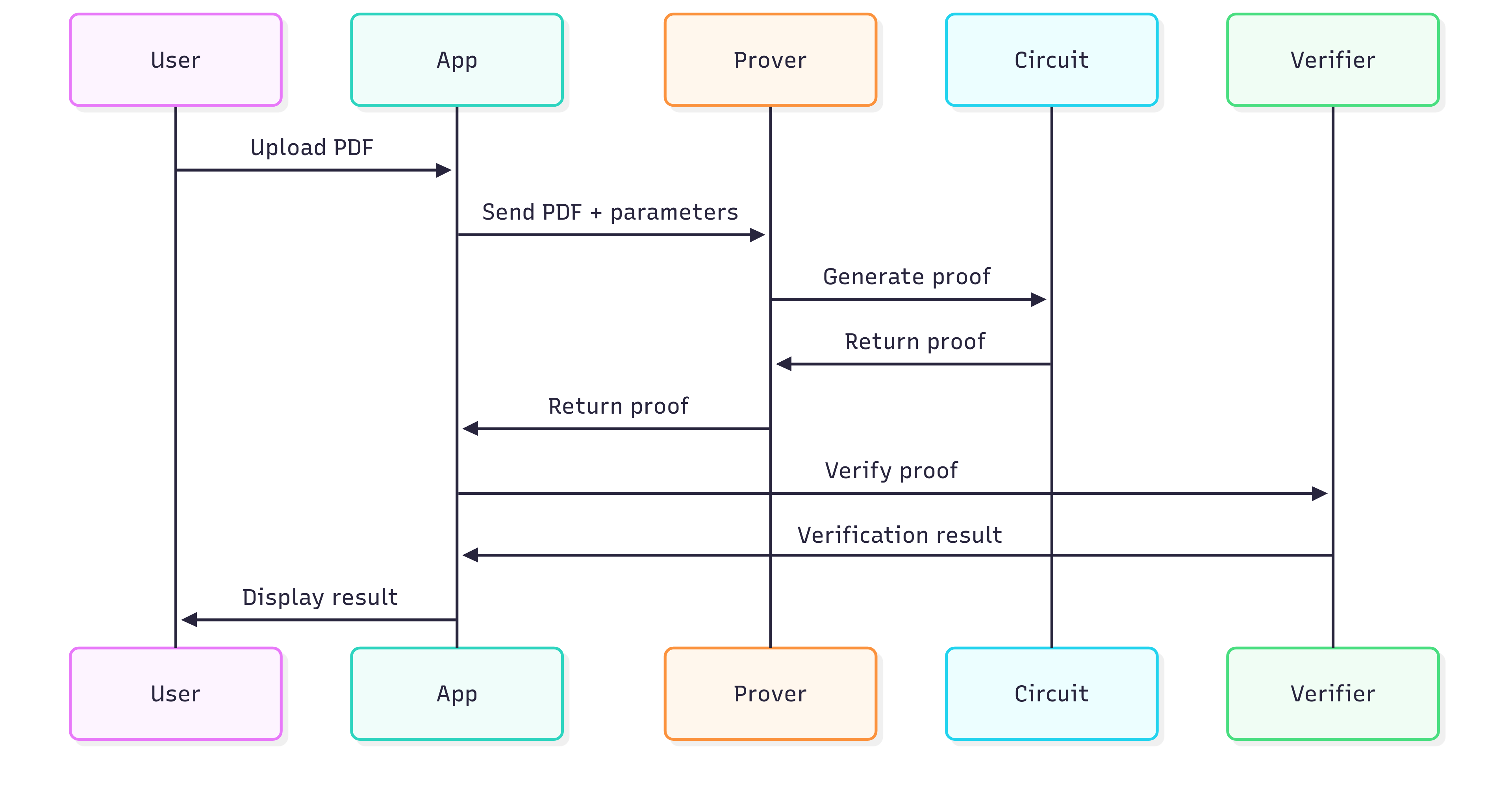
System Overview
The verification process:
- PDF document is parsed to extract text and validate digital signatures
- Verification claims are processed through SP1 zero-knowledge circuits
- Cryptographic proofs are generated without revealing document content
- Proofs can be verified on-chain or off-chain
Core Components
PDF Utils (pdf-utils/)
Rust-based PDF processing library designed for zero-knowledge environments. Provides text extraction, signature validation, and unified verification interface with WebAssembly support for browser compatibility.
Circuits (circuits/)
SP1-compatible zero-knowledge circuits containing the main verification library, SP1 program implementation, and proving infrastructure utilities.
App (app/)
Next.js frontend application providing PDF upload, real-time verification, proof generation, and integration with the prover server and WASM modules.
Data Flow
PDF Processing
- Document upload through web interface
- Client-side parsing using WebAssembly
- Text and signature extraction
- Initial validation
Proof Generation
- PDF data prepared for SP1 circuits
- SP1 zkVM executes verification program
- Zero-knowledge proof generated
- Public values committed to proof
Verification
- Proof validated locally or on-chain
- Results displayed without revealing document content
PDF Support
| Feature | Support |
|---|---|
| Text extraction | ✅ |
| RSA-SHA256 signatures | ✅ |
| Multi-page documents | ✅ |
| Common font encodings and CID fonts | ✅ |
| Standard PDF structures and compression | ✅ |
| Image extraction | ❌ |
| Form fields | ❌ |
| ECDSA signatures | ❌ |
| Complex layouts and advanced font features | ❌ |
Performance Characteristics
- Large PDFs require significant memory (8-16GB)
- Proof generation: 20-3 mins depending on mode
- Browser memory limitations for file processing
API Reference
Complete reference for the ZKPDF library API with real examples from the codebase.
API Overview
| Function | Purpose | Input | Output | Use Case |
|---|---|---|---|---|
verify_pdf_claim | Generic PDF verification | PDFCircuitInput | PDFCircuitOutput | Text extraction and signature verification |
verify_gst_certificate | GST certificate verification | PDF bytes | GSTCertificate | GST number and legal name extraction |
verify_text | Text verification at specific location | PDF bytes, page, offset, text | Boolean | Verify text appears at exact position |
verify_and_extract | Simple verification and extraction | PDF bytes | VerificationResult | Basic PDF verification with text extraction |
extract_text | Text extraction only | PDF bytes | Vec | Extract all text from PDF pages |
verify_signature | Signature verification only | PDF bytes | SignatureResult | Validate digital signatures |
Core Functions
verify_pdf_claim
Generic PDF verification function for text extraction and signature verification in zero-knowledge circuits.
#![allow(unused)]
fn main() {
pub fn verify_pdf_claim(input: PDFCircuitInput) -> Result<PDFCircuitOutput, String>
}
Parameters:
input: PDFCircuitInput- Input containing PDF bytes and verification parameters
Returns:
Result<PDFCircuitOutput, String>- Verification result or error message
Example from circuits/script/src/bin/main.rs:
#![allow(unused)]
fn main() {
use zkpdf_lib::{types::PDFCircuitInput, verify_pdf_claim};

// Load PDF from file
let pdf_bytes = std::fs::read("digitally_signed.pdf")
    .expect("Failed to read PDF file");

let proof_input = PDFCircuitInput {
    pdf_bytes,
    page_number: 0,
    offset: 0,
    substring: "Sample Signed PDF Document".to_string(),
};

let result = verify_pdf_claim(proof_input)?;
}
verify_gst_certificate
GST certificate specific verification that extracts GST number and legal name using regex patterns.
#![allow(unused)]
fn main() {
pub fn verify_gst_certificate(pdf_bytes: Vec<u8>) -> GSTCertificate
}
Parameters:
pdf_bytes: Vec<u8>- PDF file bytes
Returns:
GSTCertificate- Structure containing GST number, legal name, and signature
Example from circuits/lib/src/gst_example.rs:
#![allow(unused)]
fn main() {
use zkpdf_lib::verify_gst_certificate;

let pdf_bytes = std::fs::read("gst_certificate.pdf")?;
let gst_cert = verify_gst_certificate(pdf_bytes);

println!("GST Number: {}", gst_cert.gst_number);
println!("Legal Name: {}", gst_cert.legal_name);
println!("Signature Valid: {}", gst_cert.signature.is_valid);
}
extract_text
Extract text from PDF pages without verification (from pdf_core crate).
#![allow(unused)]
fn main() {
pub fn extract_text(pdf_bytes: Vec<u8>) -> Result<Vec<String>, String>
}
Parameters:
pdf_bytes: Vec<u8>- PDF file bytes
Returns:
Result<Vec<String>, String>- Vector of page text or error message
Example:
#![allow(unused)]
fn main() {
use zkpdf_lib::extract_text;

let pdf_bytes = std::fs::read("document.pdf")?;
let pages = extract_text(pdf_bytes)?;

for (i, page) in pages.iter().enumerate() {
    println!("Page {}: {}", i + 1, page);
}
}
verify_text
Verify text at specific position with signature validation (from pdf_core crate).
#![allow(unused)]
fn main() {
pub fn verify_text(
    pdf_bytes: Vec<u8>,
    page_number: u8,
    substring: &str,
    offset: usize
) -> Result<PdfVerificationResult, String>
}
Parameters:
pdf_bytes: Vec<u8>- PDF file bytespage_number: u8- Page number (0-indexed)substring: &str- Text to search foroffset: usize- Byte offset to start search
Returns:
Result<PdfVerificationResult, String>- Verification result with text matches and signature
Example usage in verify_pdf_claim:
#![allow(unused)]
fn main() {
use zkpdf_lib::verify_text;

// From circuits/lib/src/lib.rs
let result = verify_text(pdf_bytes, page_number, substring.as_str(), offset as usize)?;
}
verify_pdf_signature
Signature-only verification (from signature_validator crate).
#![allow(unused)]
fn main() {
pub fn verify_pdf_signature(pdf_bytes: Vec<u8>) -> Result<PdfSignatureResult, String>
}
Parameters:
pdf_bytes: Vec<u8>- PDF file bytes
Returns:
Result<PdfSignatureResult, String>- Signature verification result or error message
Example:
#![allow(unused)]
fn main() {
use zkpdf_lib::verify_pdf_signature;

let signature_result = verify_pdf_signature(pdf_bytes)?;

if signature_result.is_valid {
    println!("Document is signed by: {}", signature_result.signer_info);
    println!("Algorithm: {}", signature_result.signature_algorithm);
}
}
verify_and_extract
Combined verification and extraction in one call (from pdf_core crate).
#![allow(unused)]
fn main() {
pub fn verify_and_extract(pdf_bytes: Vec<u8>) -> Result<PdfVerifiedContent, String>
}
Parameters:
pdf_bytes: Vec<u8>- PDF file bytes
Returns:
Result<PdfVerifiedContent, String>- Verified content with pages and signature
Example from GST verification:
#![allow(unused)]
fn main() {
use zkpdf_lib::verify_and_extract;

// From circuits/lib/src/gst_example.rs
let verified_content = verify_and_extract(pdf_bytes).unwrap();
let full_text = verified_content.pages.join(" ");
// Extract specific patterns from full_text...
}
Data Structures
PDFCircuitInput
Input structure for PDF verification circuits (from types.rs).
#![allow(unused)]
fn main() {
#[derive(Debug, Clone, Serialize, Deserialize)]
pub struct PDFCircuitInput {
    pub pdf_bytes: Vec<u8>,
    pub page_number: u8,
    pub offset: u32,
    pub substring: String,
}
}
Fields:
pdf_bytes: Vec<u8>- PDF file bytespage_number: u8- Page number (0-indexed)offset: u32- Byte offset for text verificationsubstring: String- Text substring to verify
PDFCircuitOutput
Output structure for PDF verification circuits (from types.rs).
#![allow(unused)]
fn main() {
#[derive(Debug, Clone, Serialize, Deserialize)]
pub struct PDFCircuitOutput {
    // Output details are handled internally by PublicValuesStruct
}
}
GSTCertificate
Structure for GST certificate verification results (from gst_example.rs).
#![allow(unused)]
fn main() {
pub struct GSTCertificate {
    pub gst_number: String,
    pub legal_name: String,
    pub signature: PdfSignatureResult,
}
}
Fields:
gst_number: String- Extracted GST number using regex patternlegal_name: String- Legal name of the businesssignature: PdfSignatureResult- Signature verification result
PublicValuesStruct
Public values structure for zero-knowledge circuit outputs (from types.rs).
#![allow(unused)]
fn main() {
#[derive(Debug, Clone, Serialize, Deserialize)]
pub struct PublicValuesStruct {
    pub substringMatches: bool,
    pub messageDigestHash: [u8; 32],
    pub signerKeyHash: [u8; 32],
    pub substringHash: [u8; 32],
    pub nullifier: [u8; 32],
}
}
Fields:
substringMatches: bool- Whether the substring was foundmessageDigestHash: [u8; 32]- Hash of the message digestsignerKeyHash: [u8; 32]- Hash of the signer's public keysubstringHash: [u8; 32]- Hash of the substringnullifier: [u8; 32]- Nullifier for privacy
PdfVerificationResult
Result structure for PDF text verification.
#![allow(unused)]
fn main() {
#[derive(Debug, Clone)]
pub struct PdfVerificationResult {
    pub substring_matches: Vec<usize>,
    pub page_text: String,
    pub verification_successful: bool,
}
}
Fields:
substring_matches: Vec<usize>- Byte offsets where substring was foundpage_text: String- Extracted text from the pageverification_successful: bool- Whether verification was successful
PdfSignatureResult
Result structure for PDF signature verification.
#![allow(unused)]
fn main() {
#[derive(Debug, Clone)]
pub struct PdfSignatureResult {
    pub is_valid: bool,
    pub signer_info: String,
    pub signature_algorithm: String,
    pub signing_time: u64,
    pub certificate_info: String,
}
}
Fields:
is_valid: bool- Whether the signature is validsigner_info: String- Information about the signersignature_algorithm: String- Algorithm used for signingsigning_time: u64- Timestamp of signingcertificate_info: String- Certificate information
PublicValuesStruct
Public values structure for circuit outputs.
#![allow(unused)]
fn main() {
#[derive(Debug, Clone, Serialize, Deserialize)]
pub struct PublicValuesStruct {
    pub result: bool,
}
}
Fields:
result: bool- Boolean result of the verification
Error Types
Common Error Messages
"PDF parsing failed"- PDF file could not be parsed"Text not found"- Specified text was not found"Invalid signature"- PDF signature is invalid"Page not found"- Specified page number is out of range"Offset out of range"- Specified offset is beyond page content"Serialization error"- Error serializing input data"Deserialization error"- Error deserializing output data
WebAssembly API
JavaScript Bindings
The WASM module provides JavaScript bindings for browser usage:
// Initialize the WASM module
import init, { verify_pdf_claim } from "./pkg/wasm.js";

await init();

// Verify PDF in browser
function verifyPDFInBrowser(pdfBytes, pageNumber, substring, offset) {
  try {
    const result = verify_pdf_claim(pdfBytes, pageNumber, substring, offset);
    return {
      success: true,
      result: result,
    };
  } catch (error) {
    return {
      success: false,
      error: error.message,
    };
  }
}
TypeScript Definitions
interface PDFCircuitInput {
  pdf_bytes: Uint8Array;
  page_number: number;
  offset: number;
  substring: string;
}

interface PDFCircuitOutput {
  substring_matches: number[];
  page_number: number;
  offset: number;
  signature: PdfSignatureResult;
}

interface PdfSignatureResult {
  is_valid: boolean;
  signer_info: string;
  signature_algorithm: string;
  signing_time: number;
  certificate_info: string;
}

declare function verify_pdf_claim(input: PDFCircuitInput): PDFCircuitOutput;
declare function extract_text(pdf_bytes: Uint8Array): string[];
declare function verify_pdf_signature(
  pdf_bytes: Uint8Array
): PdfSignatureResult;
Next Steps
- Examples: Practical usage examples
- FAQ: Common questions and answers
- Proving: Generate proofs from your circuits
- Verification: Verify proofs on-chain
Proving
This section covers how to generate zero-knowledge proofs from ZKPDF circuits using different approaches.
Using the Succinct Prover Network
While local proof generation works well for development and testing, we've partnered with Succinct Labs to provide access to their powerful Prover Network for hackathons and production applications.
Why Use the Prover Network?
- Eliminates Server Limitations: No need to run heavy proving computations locally
- Faster Proof Generation: Distributed proving infrastructure for better performance
- Cost Effective: Pay-per-use model for proof generation
- Scalable: Handle multiple proofs simultaneously
- Production Ready: Enterprise-grade proving infrastructure
Getting Access
- Generate a Public Key: Create a new public key for prover network access
- Fill the Access Form: Submit your details at https://forms.gle/aqVoYupq3cjNYtCf8
- Get Added to Delegation: We'll add your public key to the delegation list
- Access the Explorer: Login to https://explorer.reserved.succinct.xyz/
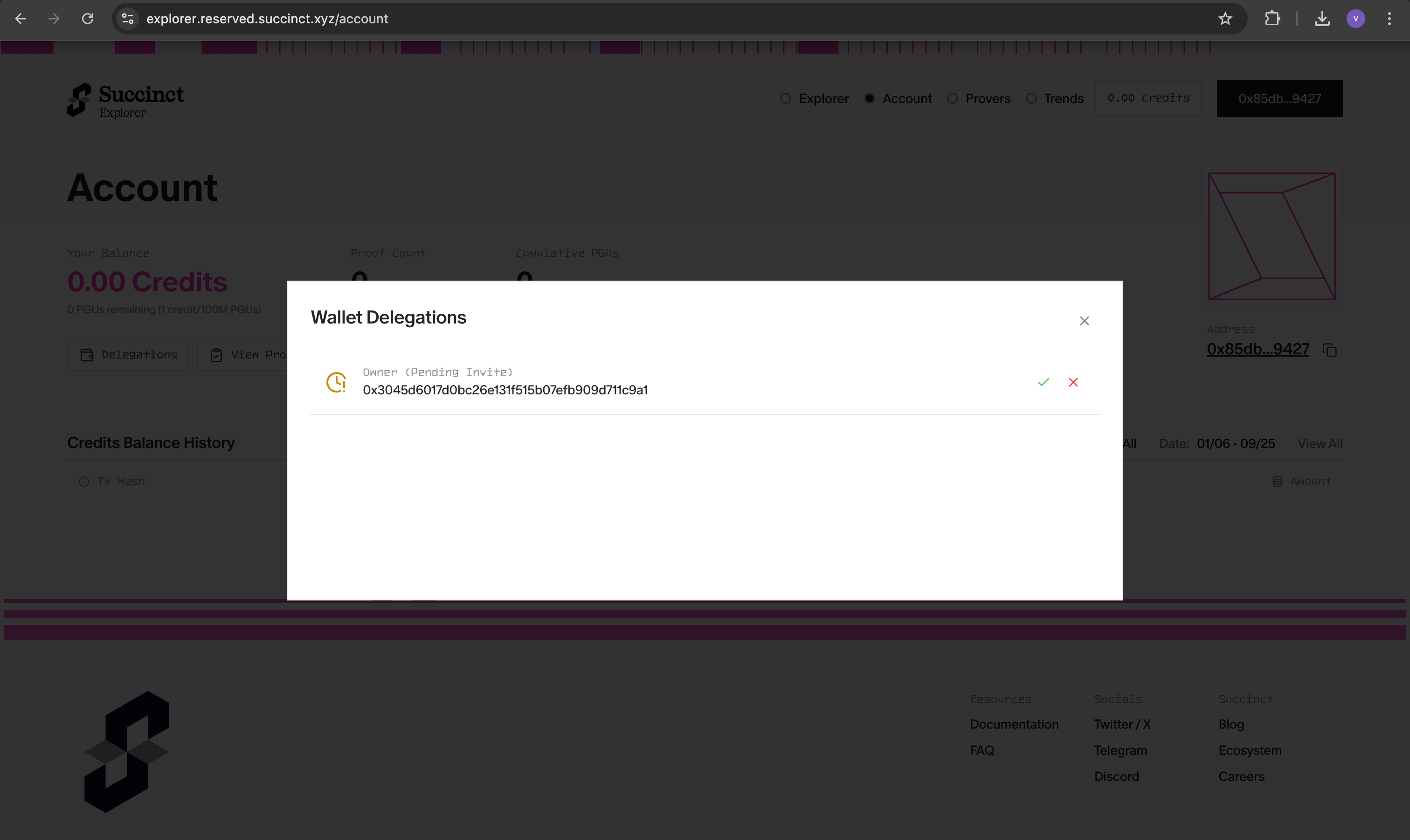
- Approve Access: Click the approve button to activate your prover network access
Configuration
Option 1: Environment Variables
# Set prover network environment
export SP1_PROVER=network
export NETWORK_PRIVATE_KEY=your_private_key_here

# Generate proofs using the network
cargo run --release --bin evm -- --system groth16
Option 2: .env File (Recommended)
Create a .env file in your project root:
# Copy the example environment file
cp .env.example .env
Then edit .env with your credentials:
SP1_PROVER=network
NETWORK_PRIVATE_KEY=your_private_key_here
The .env file will be automatically loaded when you run the scripts.
Using the Prover Network
Once configured, you can generate proofs using the distributed network:
# Generate Groth16 proof using the network
cargo run --release --bin evm -- --system groth16

# Generate PLONK proof using the network
cargo run --release --bin evm -- --system plonk

# Use custom PDF with the network
cargo run --release --bin evm -- --system groth16 --pdf-path /path/to/your/certificate.pdf
Benefits for Hackathons
The Succinct Prover Network is particularly valuable for hackathons because:
- No Setup Required: Skip complex proving infrastructure setup
- Fast Iteration: Quick proof generation for rapid prototyping
- Cost Effective: Pay only for what you use
- Reliable: Enterprise-grade uptime and performance
- Scalable: Handle multiple team members simultaneously
Benchmarks
Performance metrics for zkPDF proof generation using the Succinct Prover Network:
| Metric | PDF #1 | PDF #2 (PAN Card from DigiLocker) |
|---|---|---|
| PDF Size | 268.0 KiB | 104.0 KiB |
| SP1 Network Link | View Proof | View Proof |
| Document Type | Signed PDF | PAN Card from DigiLocker |
| Signature Algorithm | RSA with SHA1 | RSA with SHA256 |
| SP1 Version | sp1-v5.0.0 | sp1-v5.0.0 |
| Proof Time (Groth16) | 52 seconds | 31 seconds |
| Cycle Count | 44,052,327 cycles | 29,940,291 cycles |
| Gas Used | 50,575,525 | 35,255,053 |
Performance Notes
- Proof Time: Groth16 proofs typically take 30-60 seconds depending on document complexity
- Cycle Count: Higher cycle counts indicate more complex PDF processing
- Gas Usage: On-chain verification costs scale with proof complexity
- Document Size: Larger PDFs generally require more processing time
Troubleshooting
Access Issues
If you're having trouble accessing the prover network:
- Verify Form Submission: Ensure you've submitted the access form
- Check Delegation: Confirm your public key has been added to the delegation list
- Explorer Access: Make sure you can login to the explorer and see your delegation
- Contact Support: Ping @vikasrushi on Telegram for immediate assistance
Configuration Issues
# Verify your environment variables
echo $SP1_PROVER
echo $NETWORK_PRIVATE_KEY

# Check .env file exists and has correct format
cat .env
Note: For immediate access to the Prover Network, please ping @vikasrushi on Telegram after submitting the form.
Server-Side Proving
Server-side proving is the recommended approach for production applications, providing better performance, security, and resource management.
Prover Server Setup
ZKPDF includes a built-in prover server that handles PDF verification and proof generation requests.
Starting the Prover Server
cd script
cargo run --release --bin prover
The server runs on port 3001 by default and provides two endpoints:
/prove- Generate proofs/verify- Verify proofs
Environment Configuration
Set up your environment variables:
export SP1_PROVER=network
export NETWORK_PRIVATE_KEY=your_private_key_here
export PORT=3001
API Endpoints
Generate Proof
POST /prove
{
  "pdf_bytes": [
    /* PDF file bytes */
  ],
  "page_number": 0,
  "sub_string": "Important Document",
  "offset": 100
}
Response:
{
  "proof": "/* SP1 proof bytes */",
  "public_values": "/* Public values */"
}
Verify Proof
POST /verify
{
  "proof": "/* SP1 proof bytes */",
  "public_values": "/* Public values */"
}
Response:
{
  "valid": true,
  "error": null
}
Integration Example
// Generate proof
const response = await fetch("http://localhost:3001/prove", {
  method: "POST",
  headers: { "Content-Type": "application/json" },
  body: JSON.stringify({
    pdf_bytes: pdfBytes,
    page_number: 0,
    sub_string: "Important Document",
    offset: 100,
  }),
});

const proof = await response.json();

// Verify proof
const verifyResponse = await fetch("http://localhost:3001/verify", {
  method: "POST",
  headers: { "Content-Type": "application/json" },
  body: JSON.stringify(proof),
});

const result = await verifyResponse.json();
console.log("Proof valid:", result.valid);
Benefits
- Scalability: Handle multiple requests simultaneously
- Security: Keep proving keys on the server
- Performance: Optimized server resources
- Reliability: Enterprise-grade infrastructure
On-chain Verification
This section covers how to verify ZKPDF proofs on blockchain networks and integrate them into your applications.
Overview
ZKPDF generates zero-knowledge proofs that can be verified on-chain using smart contracts. The verification process ensures document authenticity without revealing sensitive content.
Smart Contract Integration
The PdfVerifier contract provides on-chain proof verification:
// SPDX-License-Identifier: MIT
pragma solidity ^0.8.20;

import {ISP1Verifier} from "@sp1-contracts/ISP1Verifier.sol";

struct PublicValuesStruct {
    bool result;
}

/// @title PdfVerifier
/// @notice Verifies SP1 proofs for the zkPDF program and returns the attested result.
contract PdfVerifier {
    /// @notice Address of the on-chain SP1 verifier contract.
    address public verifier;

    /// @notice Verification key for the zkPDF program.
    bytes32 public programVKey;

    constructor(address _verifier, bytes32 _programVKey) {
        verifier = _verifier;
        programVKey = _programVKey;
    }

    /// @notice Verifies a zkPDF proof and returns the attested result flag.
    /// @param _publicValues ABI-encoded public values emitted by the zkPDF program.
    /// @param _proofBytes Encoded SP1 proof bytes.
    function verifyPdfProof(
        bytes calldata _publicValues,
        bytes calldata _proofBytes
    ) public view returns (bool) {
        ISP1Verifier(verifier).verifyProof(
            programVKey,
            _publicValues,
            _proofBytes
        );
        PublicValuesStruct memory publicValues = abi.decode(
            _publicValues,
            (PublicValuesStruct)
        );
        return publicValues.result;
    }
}
Deployment
1. Deploy SP1 Verifier Contract
First, deploy the SP1 verifier contract to your target network:
# Get the SP1 verifier contract address
# This is typically provided by Succinct Labs
export SP1_VERIFIER_ADDRESS="0x..."

# Deploy using Foundry
forge create --rpc-url $RPC_URL \
  --private-key $PRIVATE_KEY \
  src/PdfVerifier.sol:PdfVerifier \
  --constructor-args $SP1_VERIFIER_ADDRESS $PROGRAM_VKEY
2. Get Program Verification Key
Generate the program verification key:
cd circuits/script
cargo run --release --bin vkey
This will output the verification key hash that you need for contract deployment.
3. Deploy PdfVerifier Contract
# Deploy the contract with the SP1 verifier address and program key
forge create --rpc-url $RPC_URL \
  --private-key $PRIVATE_KEY \
  src/PdfVerifier.sol:PdfVerifier \
  --constructor-args $SP1_VERIFIER_ADDRESS $PROGRAM_VKEY
Next Steps
Now that you understand on-chain verification, you can:
- Custom Circuits: Build custom verification logic
- Proving: Set up proof generation workflows
- Introduction: Learn more about ZKPDF architecture
FAQ
Frequently asked questions about ZKPDF, covering common issues, troubleshooting, and best practices.
General Questions
What is ZKPDF?
ZKPDF is a zero-knowledge proof system for verifying PDF documents. It allows you to cryptographically prove properties about PDFs (like specific text appearing at exact positions or valid digital signatures) without revealing the entire document content.
What are the main use cases for ZKPDF?
- Document Authentication: Prove a document is signed by a trusted authority
- Selective Disclosure: Reveal specific fields from government-issued certificates
- Smart Contract Integration: Use verified document facts in blockchain applications
- Fraud Prevention: Detect if documents have been tampered with
- Compliance: Meet regulatory requirements for document verification
Is ZKPDF production-ready?
ZKPDF is actively developed and used in production environments. However, it's important to:
- Test thoroughly with your specific PDF types
- Understand the limitations (see Architecture)
- Implement proper error handling
- Consider performance implications for large documents
Technical Questions
What PDF formats are supported?
ZKPDF supports standard PDF files with the following features:
- ✅ Text extraction from PDF streams
- ✅ Digital signatures (RSA-SHA256, SHA384, SHA512)
- ✅ Multi-page documents
- ✅ Compressed streams
- ❌ Images (extraction not supported)
- ❌ Form fields
- ❌ ECDSA signatures
- ❌ Complex layouts
How accurate is text extraction?
Text extraction accuracy depends on:
- Font encoding: Better accuracy with standard encodings
- PDF structure: Well-structured PDFs extract more accurately
- Font types: Some custom fonts may not extract perfectly
- Layout complexity: Simple layouts extract better than complex ones
What signature algorithms are supported?
Currently supported:
- ✅ RSA-SHA256
- ✅ RSA-SHA384
- ✅ RSA-SHA512
- ❌ ECDSA signatures
- ❌ DSA signatures
How do I check if my PDF is compatible with ZKPDF?
Use the ZKPDF Compatibility Checker to verify if your PDF will work with zkPDF:
🔗 https://privacy-ethereum.github.io/zkpdf/
Simply drop your PDF file into the compatibility checker to:
- ✅ Verify digital signature compatibility
- ✅ Check PDF structure and format
- ✅ Test text extraction capabilities
- ✅ Validate signature algorithms
This tool helps you determine if your PDF will work with zkPDF before implementing it in your application.
How do I handle different PDF generators?
Different PDF generators may produce different byte layouts. To handle this:
- Use offset ranges instead of exact offsets
- Test with multiple PDF generators
- Use signature verification for authenticity
- Implement fallback strategies
#![allow(unused)]
fn main() {
// Instead of exact offset
let result = verify_text(pdf_bytes, 0, "CONFIDENTIAL", 100)?;

// Use offset range
let result = verify_text_range(pdf_bytes, 0, "CONFIDENTIAL", 90, 110)?;
}
Can I run ZKPDF on client-side mobile or browser?
No, you cannot run ZKPDF on client-side mobile or browser. ZKPDF is computationally heavy and requires significant resources that are not available in mobile browsers or client-side environments. The zero-knowledge proof generation process involves:
- Heavy cryptographic computations requiring substantial CPU power
- Large memory requirements (hundreds of MB to GB)
- Complex PDF parsing and signature verification
- Proof generation that takes 30-60 seconds even on powerful servers
Recommended approach: Use server-side proving with the Succinct Prover Network or your own server infrastructure, then verify proofs on-chain or through API calls.
Integration Questions
How do I integrate ZKPDF with my application?
Integration depends on your use case:
- Rust applications: Use the library directly
- Web applications: Use WASM bindings
- Node.js applications: Use the prover API
- Smart contracts: Deploy verification contracts
Can I use ZKPDF with other blockchain networks?
Yes, ZKPDF proofs can be verified on any network that supports the SP1 verifier:
- ✅ Ethereum
- ✅ Polygon
- ✅ Arbitrum
- ✅ Optimism
- ✅ Other EVM-compatible networks
How do I deploy verification contracts?
- Deploy SP1 verifier (if not already deployed)
- Get program verification key
- Deploy PdfVerifier contract
- Test with sample proofs
# Deploy contract
forge create --rpc-url $RPC_URL \
  --private-key $PRIVATE_KEY \
  src/PdfVerifier.sol:PdfVerifier \
  --constructor-args $SP1_VERIFIER_ADDRESS $PROGRAM_VKEY
What if I need to support new PDF features?
ZKPDF is designed to be extensible:
- Fork the repository
- Add new features to pdf-utils
- Update circuits if needed
- Submit pull request
License Questions
What license does ZKPDF use?
ZKPDF is licensed under the MIT License. See the LICENSE file for details.
Can I use ZKPDF commercially?
Yes, the MIT License allows commercial use with minimal restrictions.
Do I need to attribute ZKPDF?
While not required, attribution is appreciated. You can include:
This project uses ZKPDF for PDF verification.
https://github.com/privacy-ethereum/zkpdf
Next Steps
- Examples: Practical usage examples
- API Reference: Complete API documentation
- Proving: Generate proofs from your circuits
- Verification: Verify proofs on-chain